Introduction
A successful cold email campaign starts long before the first message is sent. It starts with the quality of your prospect data.
You can spend hours defining your ideal customer profile (ICP), identifying decision-makers, writing personalized messages, and building follow-up sequences. But if your prospect list contains invalid, outdated, or risky email addresses, part of that effort can be wasted before your message has a chance to start a conversation.
That is where email verification comes in.
Email verification helps you assess whether an email address is likely to accept messages before you add it to a campaign. It can help identify invalid addresses, highlight potential delivery risks, and keep your prospect database cleaner.
However, email verification does not guarantee inbox placement. Sender reputation, email authentication, message content, recipient engagement, and sending behavior also influence deliverability.
In this guide, we'll explain what email verification checks, why it matters for cold email, how to interpret verification results, and how to build email verification into a practical B2B outbound workflow.
What Is Email Verification?
Email verification is the process of checking an email address to estimate whether it is correctly formatted and likely to accept incoming messages.
Depending on the verification provider, the system may examine several characteristics of an email address, including:
- Whether the email format is valid.
- Whether the domain exists.
- Whether the domain has mail servers configured.
- Whether the mailbox appears to be reachable.
- Whether the address presents potential delivery risks.
The objective is simple:
Identify problematic email addresses before they become avoidable bounces.
For example, a prospect list may contain:
alex@company.comalex.company.comalex@old-company.example
A verification process can identify a malformed address and may flag a domain that no longer appears to support email.
However, no verification provider can guarantee that an email will reach the recipient's inbox. A valid address may still reject a message, have a full mailbox, apply strict filtering, or send the message to spam.
Email verification is a data-quality check, not an inbox-placement guarantee.
Why Email Verification Matters for Cold Email
Cold email depends heavily on the quality of your prospect database. If your list contains outdated or invalid addresses, you may end up sending messages that can never reach the intended recipient.
Here are some reasons why email verification should be part of your outbound process.
1. Reduce Avoidable Bounce Rates
A bounce occurs when an email cannot be delivered to its intended recipient.
Invalid email addresses, non-existent mailboxes, and domains without working mail configuration are some reasons why messages may bounce.
Verifying addresses before launching a campaign helps identify some of these problems in advance. This can reduce avoidable bounces, although it cannot eliminate every delivery failure.
2. Protect Your Sender Reputation
Mailbox providers evaluate multiple signals when deciding how to handle incoming email. These can include sender reputation, authentication, spam complaints, recipient engagement, and sending behavior.
Repeatedly sending messages to invalid addresses can indicate poor list quality.
Keeping your contact data clean helps remove one preventable source of delivery risk. It does not replace proper authentication, responsible sending practices, or relevant messaging.
3. Use Your Outreach Capacity More Effectively
Imagine your team has collected 1,000 business email addresses. After verification, 150 addresses are identified as invalid.
Those 150 records should not be treated as ready-to-send contacts.
Separating them before launching your campaign helps your team focus its outreach effort on the remaining records and review uncertain results separately.
4. Improve Campaign Reporting
If a significant portion of your prospect list contains invalid addresses, your campaign metrics become less useful.
Your team may spend time investigating delivery problems instead of evaluating targeting, messaging, personalization, and follow-up performance.
Cleaner data gives you a more reliable starting point for measuring your outbound campaigns.
5. Maintain a Reliable Prospect Database
Business contact information changes regularly.
- People change jobs.
- Companies change domains.
- Businesses close.
- Email addresses get deactivated.
- Employees move to different departments.
That is why email verification should be part of ongoing database maintenance rather than a one-time activity.
Email Verification vs. Email Validation
Email validation and email verification are sometimes used interchangeably, but they can describe different levels of checking.
Email Validation
Email validation commonly checks whether an address follows the expected format and structure.
For example:
alex@company.com
follows a typical email format, while:
alex.company.com
is missing the @ symbol.
A syntax check can identify formatting problems, but it cannot establish whether a mailbox is active.
Email Verification
Email verification generally goes beyond syntax. It may check the domain, mail configuration, and available mailbox signals to estimate whether the address is likely to accept email.
For B2B prospecting, checking only the email format is not enough. A correctly formatted address can still belong to a non-existent mailbox or a domain that cannot receive email.
How Does Email Verification Work?
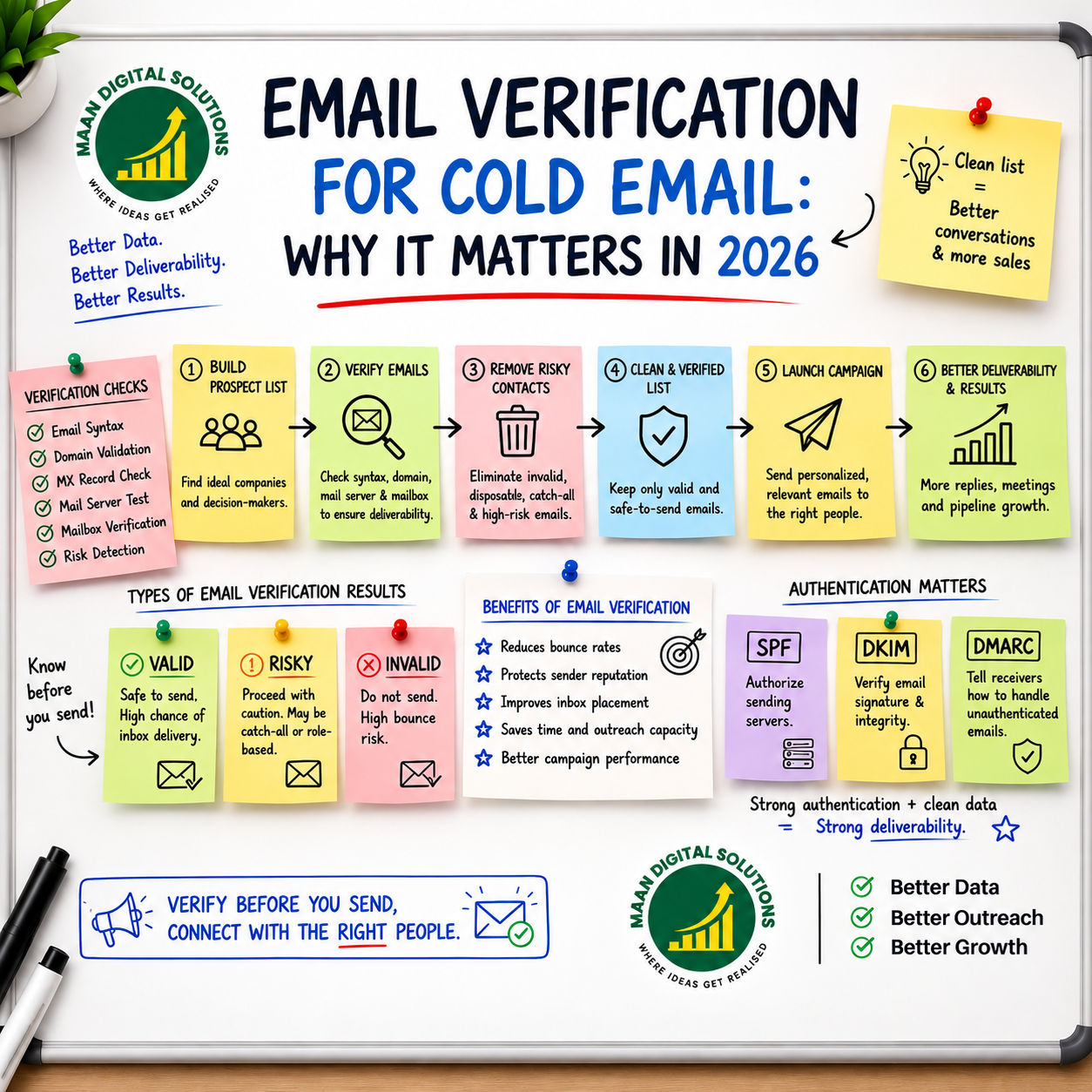
Different verification providers use different methods, and not every provider performs every check. A typical verification process may include the following stages.
1. Syntax Check
The system checks whether the email address follows a valid format.
It looks for common formatting problems, such as a missing @ symbol, invalid characters, or an incorrectly structured domain.
2. Domain Check
The system checks whether the domain exists and can be resolved.
For example, a company website may be accessible, but that does not automatically mean its domain is configured to receive email.
3. MX Record Check
Mail exchange (MX) records identify the mail servers responsible for receiving email for a domain.
If a domain does not have usable mail configuration, that is an important warning sign during the verification process.
4. Mailbox-Level Signals
Some verification providers perform additional checks with the receiving mail server to estimate whether a particular mailbox may exist.
However, mailbox verification is not always definitive. Some mail servers restrict verification attempts, limit responses, or accept messages for multiple addresses without confirming individual mailboxes.
For this reason, mailbox-level results should be treated as indicators rather than absolute guarantees.
5. Risk Classification
Verification systems may also identify addresses that require additional caution.
Examples can include:
- Disposable email addresses.
- Role-based email addresses.
- Catch-all domains.
- Known risky addresses.
- Invalid domains.
- Addresses that could not be verified conclusively.
The exact categories and definitions depend on the verification provider.
Understanding Email Verification Results
One of the most important parts of email verification is understanding what to do with the results.
Not every verification status should be treated in the same way.
| Result | What It Generally Indicates | Suggested Action |
|---|---|---|
| Valid | Available checks indicate that the address is likely to accept email. | Keep it for normal campaign review. |
| Invalid | The address appears malformed, the domain cannot receive email, or the mailbox is reported as unavailable. | Remove or correct the address. |
| Risky | The provider has detected uncertainty or a potential delivery-risk signal. | Review the reason before deciding. |
| Catch-All | The domain may accept messages for many addresses without confirming individual mailboxes. | Keep separate and apply a cautious policy. |
| Disposable | The address appears to use a temporary email service. | Usually exclude it from B2B prospecting. |
| Unknown | The provider could not reach a reliable conclusion. | Investigate or leave it out of the initial campaign. |
These are general interpretations. Different providers may use different labels or combine some categories.
Example: Segmenting a 1,000-Contact List
Suppose your team verifies a list of 1,000 business email addresses and receives the following illustrative results:
| Verification Result | Contacts | Next Step |
|---|---|---|
| Valid | 760 | Keep for normal campaign review. |
| Invalid | 120 | Remove or correct. |
| Catch-All | 70 | Separate for cautious review. |
| Risky or Unknown | 50 | Investigate before deciding. |
The numbers above are an example, not a benchmark or an expected result.
The important point is to segment your prospect list instead of uploading every record into the same campaign.
What Is a Catch-All Email Address?
A catch-all domain is configured to accept email for many or potentially all addresses at that domain, including addresses that may not correspond to individual mailboxes.
For example, a domain might accept messages addressed to both:
hello@company.comrandomname@company.com
The server may accept both without confirming whether the second mailbox is actively used by a person.
This makes catch-all addresses difficult to verify with certainty.
A catch-all result should not automatically be treated as valid or invalid. Keep these contacts separate and decide how to handle them based on your risk tolerance, the importance of the prospect, and the quality of the other contact information.
What Are Disposable Email Addresses?
Disposable email addresses are temporary addresses created for short-term use.
They are commonly associated with:
- Temporary signups.
- Testing.
- Short-lived accounts.
- Free trials.
For B2B prospecting, these addresses are generally poor candidates because they may not represent a stable business contact.
If your verification provider identifies an address as disposable, review the result and normally exclude it from your business prospecting list.
When Should You Verify Your Email List?
Email verification should not happen only once. It can be useful at multiple stages of your prospecting process.
Before Launching a Cold Email Campaign
Verify your prospect list before importing it into your cold email platform.
Remove invalid records and separate uncertain categories so they do not automatically enter the same sending sequence.
After Building a New Prospect List
If you have collected hundreds or thousands of new contacts, verify the data before using it.
This is especially important when combining information from multiple prospecting tools or data sources.
Before Reusing an Older Database
An email address that was valid several months ago may no longer be active.
People move to new roles, businesses close, domains change, and mailboxes are deactivated.
If you are reusing an older database, verify the addresses again before launching a campaign.
During Ongoing List Maintenance
For companies running outbound campaigns continuously, list hygiene should be an ongoing process rather than a one-time task.
Regularly review and remove:
- Invalid email addresses.
- Outdated contacts.
- Duplicate records.
- Contacts who have changed companies.
- Records that no longer match your target audience.
A Practical Email Verification Workflow for Cold Email
Use the following process to make email verification a regular part of your outbound operation.
Step 1: Define Your Ideal Customer Profile
Start with the companies you actually want to reach.
Define relevant industries, company sizes, locations, technologies, and business needs.
A verified email address is not useful if the person or company is not a fit for your offer.
Step 2: Identify the Right Decision-Makers
Find people whose responsibilities relate to the problem you solve.
Check their current role and company rather than relying only on old database records.
Step 3: Build and Organize Your Prospect List
Keep useful information about each prospect, such as:
- First and last name.
- Job title.
- Company name.
- Company website or domain.
- Business email address.
- LinkedIn profile.
- Lead source.
- Date collected.
Consistent records make it easier to review, update, and maintain your prospect database.
Step 4: Remove Duplicates and Obvious Errors
Before verification, standardize your data and remove duplicate contacts.
Check for missing names, malformed email addresses, and mismatched company domains.
Step 5: Verify the Email Addresses
Upload your prospect list to an email verification tool or use an API as part of an automated workflow.
Review the result for every address rather than assuming that a successful upload means every contact is valid.
Step 6: Segment the Results
Create separate groups for valid, invalid, risky, catch-all, disposable, and unknown results where your verification provider supports these categories.
Do not automatically mix uncertain results into your main send-ready list.
Step 7: Review Your Sending Setup
Check domain authentication, sending configuration, campaign relevance, and the sending limits and policies of your email provider.
Remember that email verification is only one part of campaign preparation.
Step 8: Launch Carefully and Monitor Results
Start with a controlled campaign and monitor bounce rates and recipient feedback.
If delivery problems increase, pause and investigate the cause instead of simply increasing sending volume.
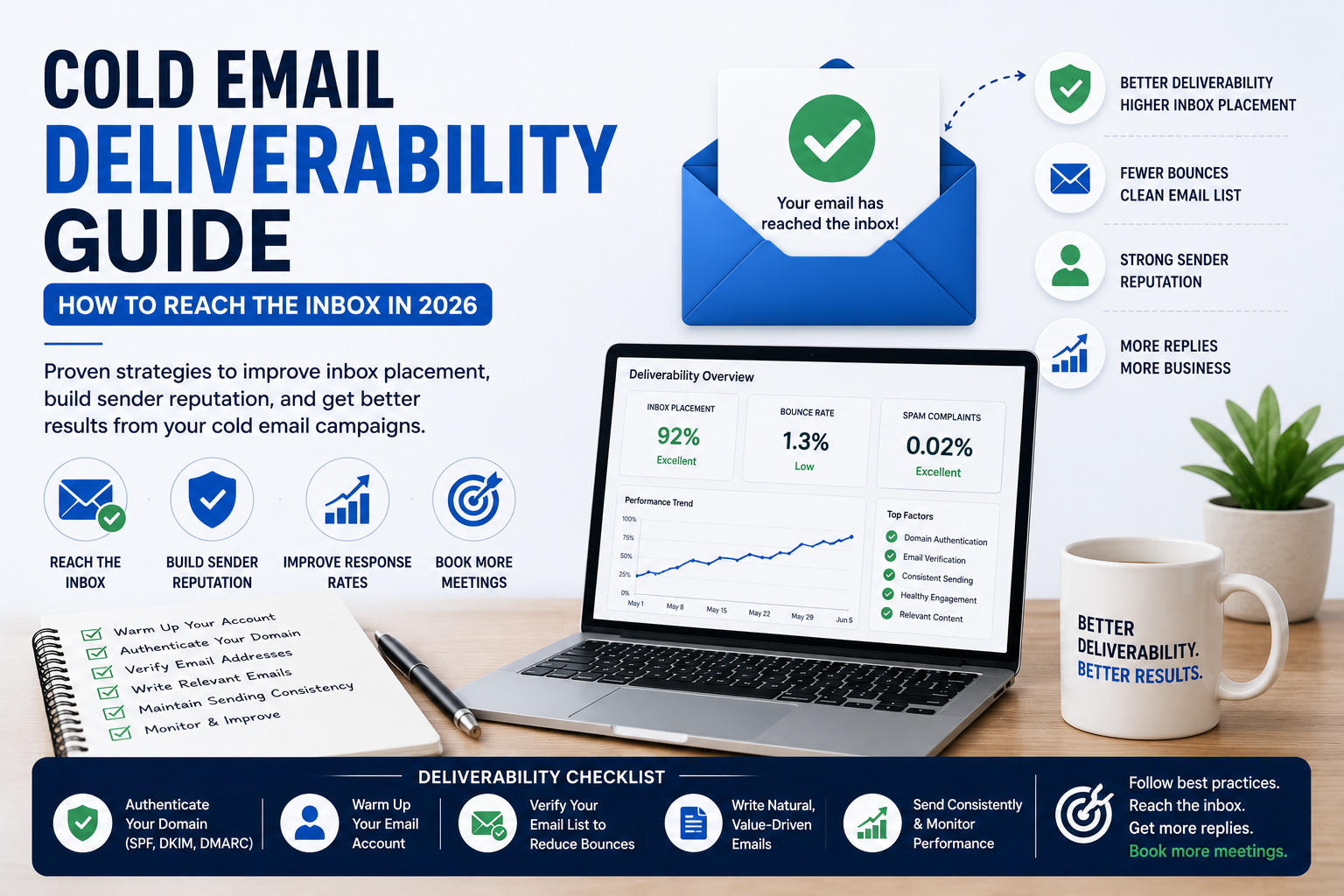
Email Verification vs. Email Deliverability
Email verification is important, but it is not the same thing as email deliverability.
Email Verification
Email verification answers the question:
Is this email address likely to accept email?
Email Deliverability
Email deliverability answers a different question:
How likely is my email to reach the recipient's inbox rather than being rejected, filtered, or placed in spam?
Deliverability depends on much more than the recipient's email address.
Important factors include:
- SPF, DKIM, and DMARC authentication.
- Domain and IP reputation.
- Spam complaints and recipient feedback.
- Sending volume and consistency.
- Email content and links.
- Recipient engagement.
- List quality.
- Email infrastructure and configuration.
A verified address can still receive a message in spam. Similarly, a well-configured sending domain cannot make a non-existent mailbox valid.
Both recipient-data quality and sender-side practices matter.
Gmail and Yahoo publish sender requirements covering authentication and sending practices. Requirements differ by sender type and volume, so check their current official guidance before configuring your sending domains.
Email verification should therefore be viewed as one part of a larger deliverability strategy.
Why SPF, DKIM, and DMARC Matter
Email verification focuses on the recipient address. Email authentication helps receiving systems assess whether messages sent using your domain are authorized.
SPF
Sender Policy Framework (SPF) identifies the mail servers and services authorized to send email on behalf of your domain.
DKIM
DomainKeys Identified Mail (DKIM) adds a cryptographic signature to messages.
Receiving systems can use this signature to check that the message is associated with the signing domain and that the signed content has not been altered in transit.
DMARC
Domain-based Message Authentication, Reporting, and Conformance (DMARC) builds on SPF and DKIM.
It allows domain owners to publish a policy for messages that fail authentication alignment and receive reports about authentication activity.
Google and Yahoo publish requirements and recommendations for email senders. Check their latest official documentation to understand which requirements apply to your sending volume and setup.
Remember: email verification does not replace SPF, DKIM, or DMARC.
How to Choose an Email Verification Tool
Not every verification tool provides the same level of information. Choose a solution based on how your team collects, processes, and uses prospect data.
1. Accuracy and Transparent Results
Look for clear explanations of what each verification status means.
No provider can guarantee perfect mailbox-level certainty, so be cautious of claims that promise 100% accuracy or guaranteed inbox placement.
2. Useful Risk Categories
Check whether the tool distinguishes between invalid, catch-all, disposable, risky, and unknown addresses—or clearly explains how it groups these results.
3. Bulk Verification
If you regularly process prospect lists, check supported file formats, list-size limits, processing speed, and how failed or incomplete records are handled.
4. API Access and Workflow Integration
An API can help teams verify addresses as they enter a CRM or prospecting workflow.
Review the API documentation, usage limits, error handling, and authentication requirements before integrating it into your systems.
5. Export and Reporting Options
You should be able to download verification results and connect them to your existing workflow.
Clear status fields make it easier to separate send-ready contacts from records that need further review.
6. Credit Usage and Pricing
Before choosing a provider, understand:
- When a verification credit is consumed.
- How retries are handled.
- Whether failed checks use credits.
- Whether unused credits expire.
7. Data Security
Prospect lists can contain business contact information.
Review the provider's privacy policy, data retention practices, access controls, and terms before uploading sensitive or confidential records.
How to Reduce Bounce Rates Before Sending Cold Email
Email verification is only one step. You also need a complete data-quality process.
1. Start With a Relevant Prospect List
Do not collect contacts simply because you can.
Target businesses that match your ideal customer profile and have a potential need for your services.
2. Identify the Correct Decision-Maker
Make sure the person you are contacting is relevant to the problem you are solving.
3. Verify Their Email Address
Check the address before adding the prospect to your sending sequence.
4. Remove or Separate Risky Addresses
Do not treat every verification result the same. Review uncertain addresses separately instead of automatically including them in your campaign.
5. Keep Your Database Updated
Review older records before reusing them. Update outdated job titles, company information, and contact details.
6. Monitor Campaign Results
Watch bounce rates and other campaign signals.
If bounce rates increase, pause and investigate instead of simply increasing sending volume.
Common Email Verification Mistakes
1. Verifying Only After a Campaign Fails
Waiting until a campaign generates bounces means you have already sent emails to potentially problematic addresses.
Verify your prospect list before sending.
2. Assuming "Valid" Means "Inbox Guaranteed"
No verification system can guarantee inbox placement.
A valid address can still:
- Reject messages.
- Have a full mailbox.
- Route messages to spam.
- Have restrictive security policies.
Verification is a risk assessment, not an inbox-placement guarantee.
3. Treating Catch-All Addresses as Confirmed Valid
Catch-all domains can accept messages without confirming that a specific mailbox exists.
Keep these addresses separate and handle them according to your risk tolerance and campaign strategy.
4. Ignoring Old Contact Data
Email databases become outdated over time.
Regularly review older records and verify addresses before reusing them.
5. Focusing Only on Email Verification
Verification will not solve problems caused by poor sender reputation, missing authentication, excessive sending volume, or irrelevant messaging.
Think of deliverability as a complete system rather than a single tool or process.
Email Verification Checklist for Cold Email
Before launching a campaign, review the following checklist:
- Prospect list matches your ideal customer profile.
- Decision-makers and current job titles have been reviewed.
- Company names and domains are consistent.
- Duplicate contacts have been removed.
- Email addresses have been verified.
- Invalid and disposable addresses have been excluded.
- Catch-all, risky, and unknown results have been separated for review.
- SPF, DKIM, and DMARC have been checked.
- Campaign messaging is relevant to the target audience.
- Sending volume and campaign settings have been reviewed.
- Bounce rates and recipient feedback will be monitored.
Following this checklist gives your campaign a stronger foundation before the first email is sent.
Frequently Asked Questions About Email Verification
Does Email Verification Guarantee That an Email Will Reach the Inbox?
No. Email verification estimates whether an address is likely to accept email.
Inbox placement also depends on sender reputation, authentication, message content, recipient engagement, and the receiving provider's filtering decisions.
How Often Should I Verify My Email List?
Verify newly collected contacts before using them in a campaign.
Recheck older lists before reusing them, and maintain your database regularly if you run ongoing outbound campaigns. The right interval depends on how quickly your contact data changes.
Should I Send Cold Emails to Catch-All Addresses?
A catch-all result does not confirm that a specific mailbox exists.
Keep these addresses separate, review the prospect's relevance and other available information, and apply a cautious decision policy rather than treating them as confirmed valid.
What Is the Difference Between a Valid and a Risky Email?
A valid result means the provider's checks indicate that the address is likely to accept email.
A risky result means the provider has detected uncertainty or a potential delivery issue. Exact definitions vary by provider, so review its status documentation.
Can I Verify a Large List of Email Addresses at Once?
Many email verification services support bulk uploads, commonly through CSV files.
Check the provider's file-size limits, supported columns, credit rules, and export options before processing a large list.
Is Email Verification Enough for Cold Email Deliverability?
No. Email verification helps improve recipient-data quality, but you also need appropriate authentication, responsible sending practices, relevant targeting, good messaging, and ongoing monitoring.
Email Verification With Bounce Guard by Maan Digital Solutions
Before a prospect list becomes a cold email campaign, it should go through a data-quality check.
Bounce Guard by Maan Digital Solutions helps teams check email lists and review verification results before using contacts for outreach.
You can make email verification a repeatable part of your prospecting process:
Build Your Prospect List → Verify Addresses → Review Results → Segment Contacts → Prepare Your Campaign → Monitor Performance
Instead of discovering invalid contacts through campaign bounces, identify potential delivery risks before sending.
The goal is not simply to send more emails. It is to spend your outreach effort on relevant prospects using cleaner, better-reviewed contact data.
If your team is building B2B prospect lists for LinkedIn and one-to-one cold email outreach, combine email verification with accurate prospect research and decision-maker targeting.
Ready to check your prospect list before your next campaign?
Try Bounce Guard by Maan Digital Solutions →
Final Thoughts
Email verification is an important data-quality step in cold email outreach.
It helps identify invalid and potentially risky addresses before sending, reduces avoidable delivery problems, and makes prospect databases easier to maintain.
But it is not a shortcut to inbox placement or campaign success.
A stronger outbound process combines:
- Accurate prospect research.
- Relevant decision-makers.
- Verified contact data.
- Properly authenticated sending domains.
- Responsible sending practices.
- Relevant messaging and personalization.
- Thoughtful follow-ups.
- Ongoing campaign monitoring.
The objective is not to send the largest number of emails. It is to reach the right people with relevant messages using reliable data.
When your prospecting and data-quality processes are strong, your outreach team can spend less time dealing with bad contacts and more time having meaningful conversations with potential customers.